☀️ Coming soon to the Chrome Web Store

Share any file.
Leak nothing.

Sunda Privacy Guard is a friendly little Chrome extension that tidies personal details out of your files before you share them with an AI. The moment it spots a private detail — an email, a phone number, an ID, a card — it swaps in a harmless placeholder and hands you a clean copy. Switch on its optional on-device AI and it catches names and addresses too, in files you protect by hand. You share like normal. The real stuff stays home, with you.

Your details never leave your device · No account · No tracking

See the swap in action

Watch your details vanish.

Hand Sunda a file with all its real details. It catches each private bit and hands back a clean copy with friendly stand-ins instead — the file still makes perfect sense, but your name, number and ID stay right where they belong: with you.

Your file

Your file: Hi, I'm Dana Levi — my email is dana@example.co.il, my phone is 052-123-4567 and my ID is 123456782. Please review my lease.

What the AI sees

What the AI sees: Hi, I'm [PERSON_1] — my email is [EMAIL_1], my phone is [PHONE_1] and my ID is [ISRAELI_ID_1]. Please review my lease.

That ID number? Sunda double-checked it was a real one before hiding it — clever, not lucky. The name? That's Sunda's little on-device AI brain pitching in when you pick a file yourself in Sunda's popup — this peek shows it switched on; the always-on rules catch the rest either way. And if you choose the optional key, every placeholder can be turned back into the original. By you, not by the AI.

How Sunda does it

Three little steps, all on your device.

No account, no cloud, no peeking. Sunda checks your files right there in your browser — then hands you the clean copy with a grin.

Sunda spots it

Hand Sunda a file in the popup — or upload one on a site you've asked it to guard — and it scans for personal details right on your device: emails, phone numbers, IDs, cards and more. Nothing gets sent anywhere to be checked.

Sunda swaps it

Each detail becomes a tidy stand-in like [EMAIL_1]. The same value always gets the same stand-in, so your file still reads naturally — to you and to the AI.

You keep the key

Want the real details back later? Choose protection with a key, and only someone holding your key can swap everything back. Your secrets, your say-so.

The guided tour

Up and running in five minutes.

Six little screenshots, zero technical skills required. Every one comes straight from the real extension that's headed to the Chrome Web Store. Here's what living with Sunda looks like, from your very first click:

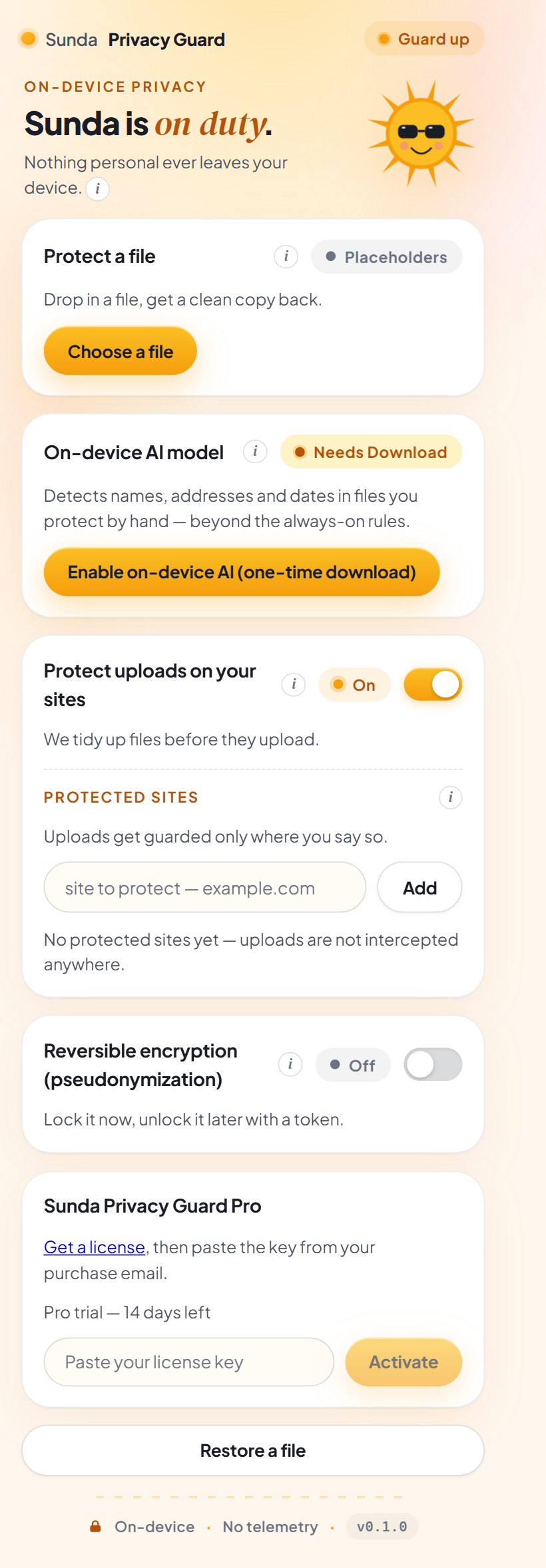
The full Sunda Privacy Guard popup: a Guard up pill, Sunda the sun on duty, a Protect a file card, an On-device AI model card, a Protect uploads on your sites toggle with its Protected sites list, a reversible encryption toggle, a Pro license card, and a Restore a file button.

Meet your sunny sidekick

Pin Sunda next to your address bar and pop it open. Everything lives in one cheerful panel: protect a file in a click, pick the sites where uploads get guarded, flip on the magic undo. The guard is up from the moment Sunda moves in — and if your computer is up for it, Sunda grows a little on-device AI brain that also spots names, addresses and dates in files you protect by hand. One tap — or the first time you protect a file — starts that one-time download, with a progress bar right in the popup. The built-in rules — Sunda's checklist of patterns like emails, phone numbers, IDs and card numbers — guard you either way.

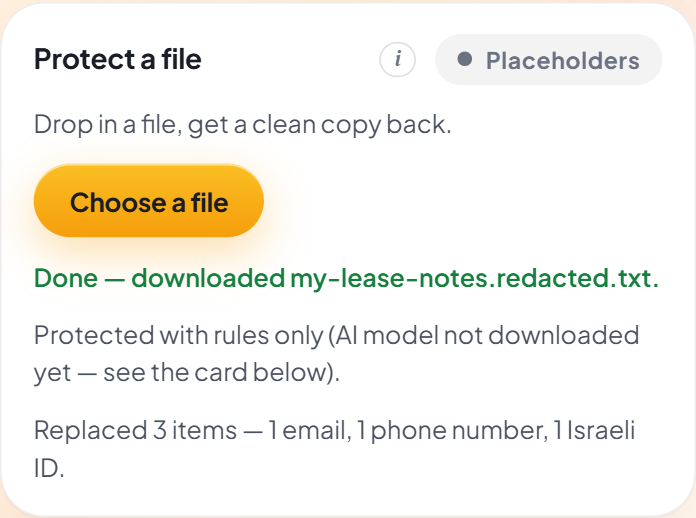
The Protect a file card after protecting: Done — downloaded my-lease-notes.redacted.txt, a note that the file was protected with rules only, and a report reading Replaced 3 items — 1 email, 1 phone number, 1 Israeli ID.

Protect a file in one click

Pick a Word or text file and Sunda hands back a clean copy — plus a tiny report of what it tucked away, like “Replaced 3 items — 1 email, 1 phone number, 1 Israeli ID,” and an honest note about which helper did the checking. Straight to your Downloads, never to the internet. (The first time you protect a file it can take a little while — Sunda's AI brain is still waking up, and it waits so your file gets the full treatment.)

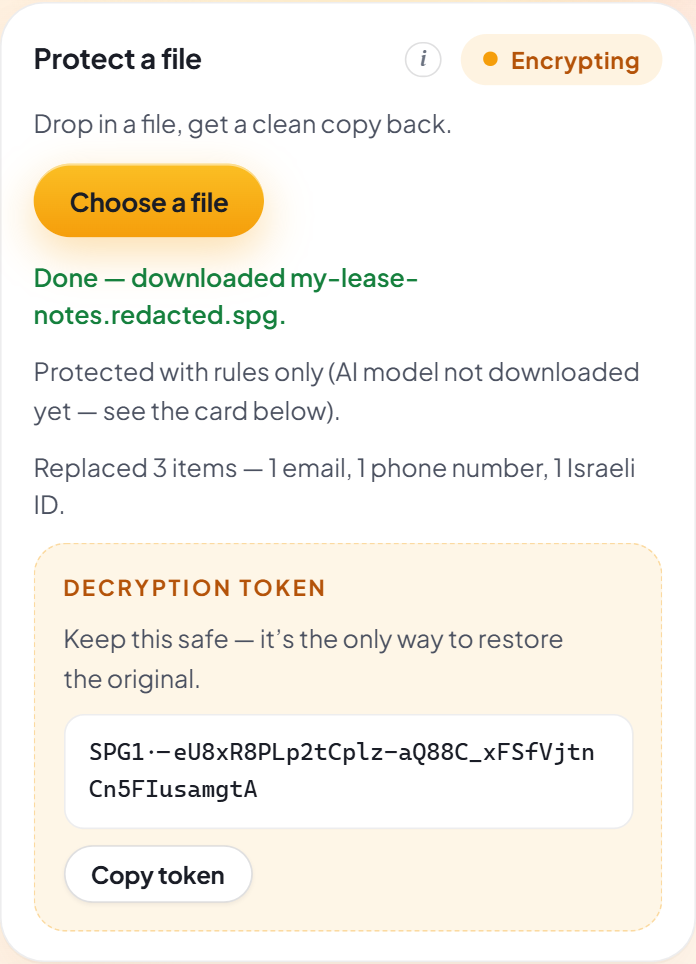
The Protect a file card with encryption on: the pill reads Encrypting, the download is my-lease-notes.redacted.spg, and below the report sits a Decryption token box with a Copy token button.

Flip on the magic undo

Turn on reversible encryption and every protected file comes with its own decryption token — a little key that can bring the original back. Copy it somewhere cozy and treat it like a spare house key: it's the only one there is, and Sunda never keeps a copy.

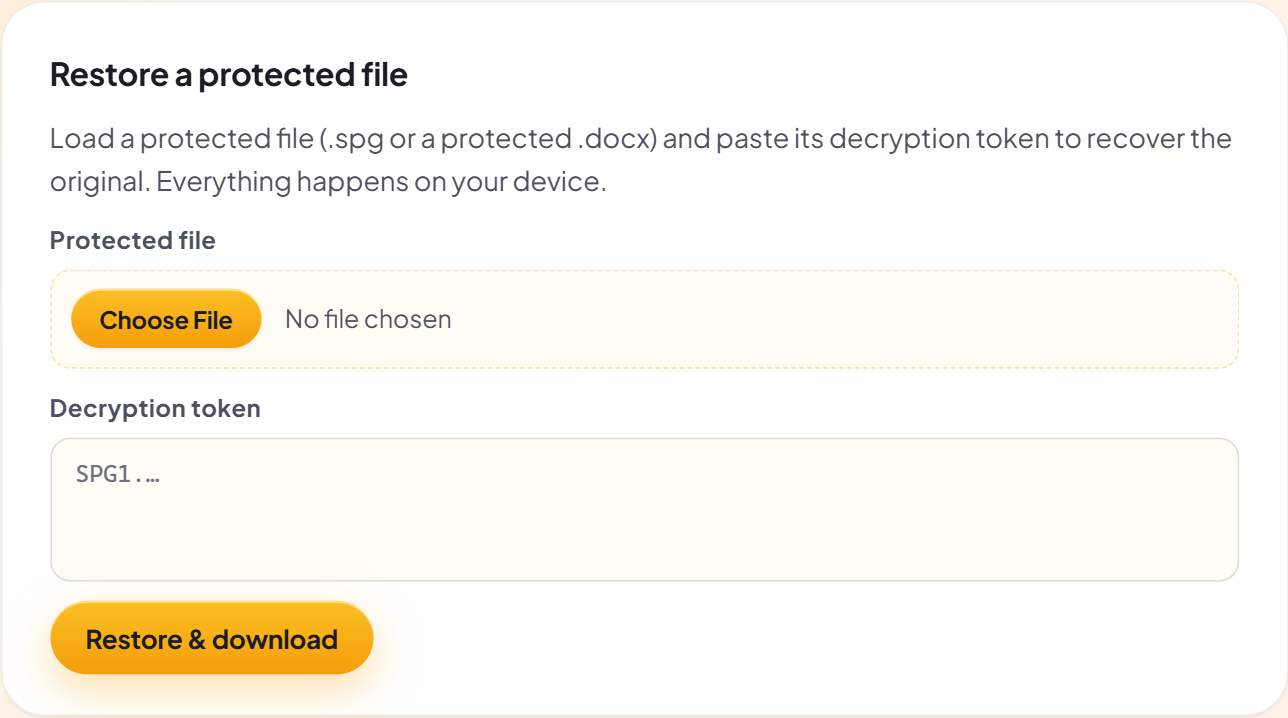
The Restore a protected file card: choose the protected file, paste the decryption token, and click Restore and download.

Get the original back

Changed your mind? Open Restore, load the protected file (the .spg or protected Word file you downloaded), paste your token, and the original is rebuilt right on your device. No cloud, no waiting, no drama.

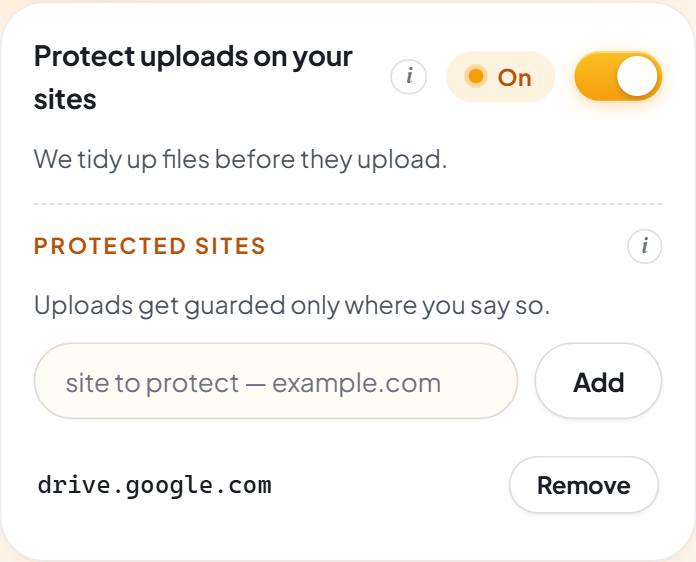
The Protect uploads on your sites card switched On, with its Protected sites list showing drive.google.com added.

Guard uploads on the sites you choose

Flip the switch, and Word and text files get a quick rules check the moment you attach them on a site from your list — emails, numbers, IDs and cards swapped out before the site sees a thing. And if a file can't be checked, Sunda blocks the upload instead of letting it slip — better a pause than a leak.

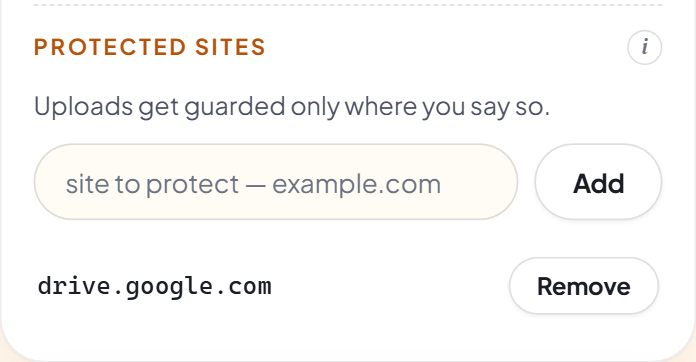
The Protected sites list: a site-to-protect input with an Add button, and drive.google.com listed with a Remove button beside it.

Tell Sunda where to stand guard

Uploads get guarded only on the sites you add — nowhere else, nothing sneaky. Type a site, click Add, and Chrome itself asks you to allow it, one site at a time. Change your mind? One click on Remove and Sunda tips its sunglasses and steps away.

Everyday wins

For anyone who shares first and panics second.

If you've ever attached a file and thought “wait — was my phone number in that?”, Sunda would like a word. A very reassuring one. Protect the file first, then ask away — here's where the little sun really shines. (One sunny footnote: catching names, addresses and account numbers is the job of Sunda's on-device AI brain — one tap to enable, and it joins in on every file you protect by hand.)

Renting a new place

Protect your lease, then ask AI to read it before you sign — without your name, address and ID tagging along for the ride.

Polishing your CV

Run your resume through Sunda, then get it sparkling — while your phone number and email stay exactly where they should: with you.

Doctor's letters, decoded

Protect a confusing medical letter or lab result, then ask for a plain-language explanation — with your personal details safely left out of it.

School forms & family emails

Protect the form or the saved email thread first, and get help replying without introducing your kids to a chatbot by name.

Bank & insurance letters

“What does this letter actually mean?” is a great question for AI. Your account number doesn't need to be part of it.

Complaints that land

Let AI sharpen your refund request or strongly-worded-but-polite letter — Sunda keeps your customer number and address out of the chat.

What's under the sunglasses

Small extension. Very protective sun.

Under the friendly exterior, Sunda has one job and does it stubbornly well: the private details in your files never reach the AI. Here's the tour, jargon-free.

Cleans your files

Pick a Word or text file in the popup and get a clean copy back in a click — private details out, placeholders in. On computers that support it, Sunda's little on-device AI brain joins in to catch names, addresses and dates too.

Guards uploads where you say so

Add a site to your Protected sites, and Word and text files get a quick rules check right as you upload them there. Only on your list — with an empty list, Sunda touches no webpage at all.

You keep the key

Choose protection with a key and you get a protected file plus a little key that turns every placeholder back into the real thing. For you — not for the AI.

Knows Israeli IDs by heart

Teudat Zehut numbers are double-checked to be real IDs, and Israeli phone formats are spotted too — alongside emails, cards and bank account numbers.

When in doubt, it blocks

No guessing games with your secrets. On your protected sites, if a file Sunda guards can't be checked, it simply doesn't get uploaded. Better a pause than a leak.

Nothing of yours leaves home

No account, no telemetry, nobody peeking. The spotting and the swapping happen inside your own browser. The only things Sunda ever fetches are its own AI brain (once) and, if you buy a license, a quick key check — never your files, never your details.

What Sunda catches

It knows what counts as personal.

Names [PERSON_1] Emails [EMAIL_1] Phone numbers [PHONE_1] Israeli IDs [ISRAELI_ID_1] Credit cards [CREDIT_CARD_1] Bank accounts [IBAN_1] Addresses [ADDRESS_1] Dates [DATE_1] Links [URL_1]

The same email always becomes [EMAIL_1], and a second one becomes [EMAIL_2] — so your file still reads naturally, to you and to the AI. Israeli IDs are even double-checked to be real ones, and Israeli phone formats are understood out of the box. Names, addresses and written-out dates are the specialty of Sunda's optional on-device AI brain, which pitches in on files you protect by hand — everything else is caught by the always-on rules, every time.

Sunda's sunny promises

Private by construction, not by promise.

It would be pretty silly to build a tool that protects your private details… by peeking at your private details. So these aren't pinky promises in a policy — they're simply how Sunda is built.

Your details are never sent

Your files, and everything found inside them, stay on your device. Sunda has no server of its own — the only things it ever talks to the internet for are fetching its own AI brain and checking a license key, and neither request ever carries your files or your details.

Nobody's watching

No analytics, no telemetry, no usage stats. Sunda never phones home about you — it wouldn't even know what to say. Even we can't peek, and that's exactly how we like it.

Your key is yours alone

The secret key that can undo the protection exists in exactly one place: the token in your hand. It's never saved to storage and never sent anywhere — lose it, and not even Sunda can bring the original back.

Nothing without your say-so

Upload guarding happens only on the sites you add, and Chrome asks your permission for each one. Keep the list empty and Sunda runs on none of your pages — not quietly on some of them.

☀️ Coming soon to the Chrome Web Store

Give your secrets a place in the shade.

Sunda Privacy Guard isn't out quite yet — the little sun is still polishing its sunglasses. When it lands, it'll be free to add: no account, no sign-up. Everything on this page already works exactly as described — the screenshots above came straight from it.

No waitlist and no email capture — collecting your email would be a funny look for a privacy tool. Just check back soon. ☀️